
In today’s digital landscape, the performance of a website is crucial for user experience and business success. One of the key metrics that web developers and marketers focus on is the First Contentful Paint (FCP) score. This article will explain what FCP is, why it matters, how to measure it, and tips for improving your website’s FCP score.
What is First Contentful Paint (FCP)?
First Contentful Paint is a web performance metric that measures the time it takes for a browser to render the first piece of content from a webpage. This content can be text, an image, or any other element that appears on the screen. FCP is a critical part of the user experience because it gives users their first visual indication that a webpage is loading.
The FCP score is usually measured in seconds, and a lower score indicates a faster loading time. It’s one of several metrics that fall under the umbrella of web performance, but it’s particularly important because it directly affects user engagement and satisfaction.
Why FCP Score Matters
1. User Experience
The FCP score is a key indicator of user experience. A fast FCP score means users see content quickly, which can lead to increased engagement and lower bounce rates. Conversely, a slow FCP can frustrate users, causing them to leave the site before it fully loads.
2. SEO Implications
Search engines like Google consider page speed as a ranking factor. Websites that load quickly tend to rank higher in search results. By improving your FCP score, you can enhance your website’s visibility and attract more organic traffic.
3. Conversion Rates
Faster-loading websites generally see higher conversion rates. Users are more likely to complete actions, such as making a purchase or signing up for a newsletter, when they have a positive experience. Improving your FCP score can, therefore, lead to increased sales and customer retention.
How to Measure FCP Score
There are various tools available to measure FCP, each offering valuable insights:
1. Google PageSpeed Insights
This tool provides a detailed report on your website’s performance, including the FCP score. It analyzes the webpage and offers suggestions for improvement.
2. WebPageTest
WebPageTest allows you to conduct real-world testing from multiple locations and devices. It provides a comprehensive breakdown of performance metrics, including FCP.
3. Lighthouse
Google’s Lighthouse is another useful tool for assessing web performance. It generates a report that includes FCP among other performance metrics and offers actionable suggestions for optimization.
Factors Influencing FCP Score
Several elements can affect your FCP score:
1. Server Response Time
The time it takes for the server to respond to a request can significantly impact FCP. If the server is slow, it will take longer for the browser to begin rendering content.
2. Resource Loading
How resources such as CSS, JavaScript, and images are loaded can affect FCP. If critical resources are blocked or take too long to load, users may see a delay in content rendering.
3. Render-Blocking Resources
JavaScript and CSS that block rendering can delay FCP. When these files are loaded synchronously, they can prevent the browser from displaying content until they are fully loaded.
4. Caching Strategies
Effective caching strategies can help reduce load times. By storing frequently accessed resources in the user’s browser, you can indeed improve FCP on repeat visits.
Tips for Improving Your FCP Score
1. Optimize Images
Large image files can significantly slow down your webpage. Compress images without sacrificing quality and use appropriate formats such as WebP for faster loading.
2. Minimize Render-Blocking Resources
Identify and then eliminate unnecessary render-blocking resources. Use techniques such as deferring non-critical JavaScript or using the “async” attribute for script tags.
3. Improve Server Response Time
Consider using a Content Delivery Network (CDN) to speed up server response times. A CDN distributes your content across multiple locations, therefore reducing the distance data must travel.
4. Implement Lazy Loading
Lazy loading is a technique that delays the loading of images and videos until they are needed. This can significantly improve FCP, especially on image-heavy pages.
5. Use Efficient Caching
Implement browser caching in order to store resources locally. This way, returning visitors can load your site faster, therefore positively affecting the FCP score.
6. Monitor Regularly
Web performance is not a one-time task, of course! Regularly monitor your FCP score and other performance metrics in order to identify areas for improvement. Tools such as Google Analytics can help track user behavior and page load times.
Conclusion
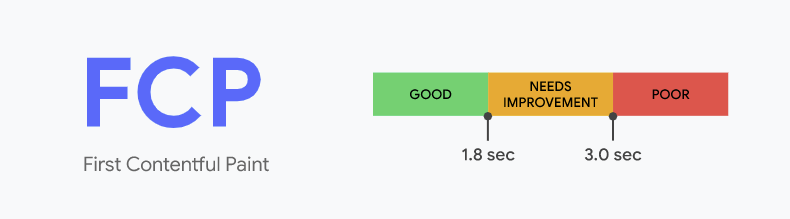
The First Contentful Paint score is indeed a vital metric for measuring web performance and user experience. By focusing on improving your FCP score, you can enhance user satisfaction, boost SEO rankings, and further increase conversion rates. With the right tools as well as strategies, optimizing FCP can lead to significant improvements in how users interact with your website. In the competitive online landscape, prioritizing FCP can indeed give your website the edge it needs to succeed.
FAQs about FCP Score
1. What is FCP score?
FCP (First Contentful Paint) score measures how quickly a webpage displays its first piece of content, thus impacting user experience.
2. Why is it important?
A good FCP score enhances user engagement, lowers bounce rates, and can also positively influence SEO rankings and conversion rates.
3. How can I measure my website’s FCP?
You can measure FCP using tools such as Google PageSpeed Insights, WebPageTest, and Lighthouse, which provide detailed performance reports.
4. What are some tips to improve it?
Optimize images, minimize render-blocking resources, improve server response time, implement lazy loading, and also utilize efficient caching strategies.
Learn in 60s
Short vertical lessons from our team. Tap to watch, swipe for the next.
 1:03Ep 10: Protections and blocks
Ep 10: Protections and blocks
 1:07Ep 9: Pricing rules after the Google ruling
Ep 9: Pricing rules after the Google ruling
 0:57Ep 8: First-price auctions and bid shading
Ep 8: First-price auctions and bid shading
 1:03Ep 7: Open Bidding, Google’s server-side header bidding
Ep 7: Open Bidding, Google’s server-side header bidding
 1:03Ep 6: Dynamic allocation
Ep 6: Dynamic allocation
 1:00Ep 5: Key-values: how header bidding talks to Ad Manager
Ep 5: Key-values: how header bidding talks to Ad Manager
 1:06Ep 4: Line item priorities
Ep 4: Line item priorities
 1:05Ep 3: Orders, line items, creatives
Ep 3: Orders, line items, creatives
 1:07Ep 2: How a page asks for an ad: the GPT tag
Ep 2: How a page asks for an ad: the GPT tag
 1:05Ep 1: AdSense vs Ad Manager vs AdX
Ep 1: AdSense vs Ad Manager vs AdX