Technically reviewed by Aditya
Prebid.js changes quickly, and a tutorial written for an older major version can send you down the wrong path. Bidder names, recommended modules and some API options have changed. For example, the setTargetingForGPTAsync reference notes that the customSlotMatching option was removed in Prebid.js 11.0. This guide walks through a working setup in the order you would actually do it: build the bundle, describe your ad slots, connect Prebid to Google Ad Manager (GPT), create the line items, then test before anything goes live.
It assumes you already run Google Ad Manager with GPT tags on your pages. If Prebid.js is new to you, start with the one-minute Learn video How Prebid.js runs an auction (also in Hindi).
Version check. On 23 November 2026 the latest Prebid.js release on GitHub was 11.53.0, published 20 November 2026. Every code example on this page was tested on 11.53.0. Prebid ships new releases often, so check the release notes before you copy anything version-specific from this page.
What you need before you start
Prebid’s own Getting Started page puts planning first, and it is right. Sort these out before anyone writes code:
- A Google Ad Manager network, with GPT already loading your ad slots.
- A list of demand partners, and the bid parameters each one has given you (placement IDs, site IDs and so on). Every bidder’s required parameters are on its page in the Prebid docs.
- A decision on how many bidders to start with. Prebid’s FAQ suggests roughly 1 to 5 demand partners for a client-side setup, and more only with server-to-server.
- Agreement with your ad ops team on three settings: send all bids or only the top bid, price granularity, and the key-values Ad Manager will receive.
Step 1: Build your Prebid.js bundle
You need a package that holds only the bid adapters and modules you use, not a generic full file copied from a public CDN. Build it on the download page or from the command line, or, since Prebid.js 11.40, with the official versioned loader on the same download page.
The download page. On docs.prebid.org/download.html, pick a Prebid version, tick the bidder adapters you use, tick any extra modules and download the file. The page now pre-ticks Prebid’s recommended modules: the GPP and TCF consent modules, GPP Control, GPT Pre-Auction, Storage Control and TCF Control. If you run Ad Manager, keep GPT Pre-Auction; Prebid says it generates the global placement ID that is becoming required for successful auctions. Untick consent modules you have no use for, but check with whoever owns your consent setup before you remove them.
The command line. If your developers prefer a repeatable build, clone the Prebid.js repository, run npm ci and build with only the modules you name:
gulp build --modules=msftBidAdapter,gptPreAuction,consentManagementTcfModule names match the file names in the repository’s modules folder. You can also keep the list in a modules.json file and pass that instead, which makes the build easy to review in code changes.
Check your bidder names too. Old tutorials often use appnexus in their examples. The Prebid download page now says support for the AppNexus adapter is reduced from 1 July 2026, with full deprecation planned for early 2027, and asks publishers to move to the Microsoft adapter (msft). Prebid’s own Basic Example now uses msft, and so does the code below. Use the bidders you actually work with.
Host the finished file on your own domain or CDN. The one-minute video Bidder adapters and your Prebid build (Hindi) explains why a lean build matters.
Step 2: Define your ad units
An ad unit tells Prebid three things about each slot: what to call it, which sizes it accepts and which bidders should bid on it. Here is one 300×250 slot with one bidder. The ad unit path and placement ID are example values, not real ones.
var adUnits = [{
  code: '/1234567/example-300x250',   // example: your GPT ad unit path
  mediaTypes: {
    banner: { sizes: [[300, 250]] }
  },
  bids: [{
    bidder: 'msft',
    params: { placement_id: 12345678 }  // example: use your own ID
  }]
}];
The code has to line up with a slot on the page. When Prebid hands bids to GPT, it first tries to match the code to the GPT slot name (the ad unit path), then to the ID of the div holding the slot, according to the setTargetingForGPTAsync reference. If it matches neither, the bids never reach Ad Manager.
Add one object to bids for each demand partner on that slot. The params differ for every bidder, so copy them from that bidder’s Prebid docs page and the values your partner sends you.
Step 3: Connect Prebid.js to GPT
This step needs the most care. GPT must wait for Prebid, and the page must still show ads if Prebid fails. The pattern below follows Prebid’s Basic Example:
<script async src="https://securepubads.g.doubleclick.net/tag/js/gpt.js"></script>
<script async src="/js/prebid.js"></script>  <!-- your build from Step 1 -->
<script>
  var FAILSAFE_TIMEOUT = 3000;
  // adUnits from Step 2 goes here

  var googletag = googletag || {};
  googletag.cmd = googletag.cmd || [];
  googletag.cmd.push(function () {
    googletag.pubads().disableInitialLoad();   // hold GPT until bids are in
  });

  var pbjs = pbjs || {};
  pbjs.que = pbjs.que || [];
  pbjs.que.push(function () {
    pbjs.setConfig({ bidderTimeout: 1000, priceGranularity: 'medium' });
    pbjs.addAdUnits(adUnits);
    pbjs.requestBids({ bidsBackHandler: sendAdServerRequest });
  });

  function sendAdServerRequest() {
    if (pbjs.adserverRequestSent) return;      // run once only
    pbjs.adserverRequestSent = true;
    googletag.cmd.push(function () {
      if (pbjs.libLoaded) {
        pbjs.que.push(function () {
          pbjs.setTargetingForGPTAsync();      // pass hb_ key-values to GPT
          googletag.pubads().refresh();
        });
      } else {
        googletag.pubads().refresh();          // Prebid did not load: show ads anyway
      }
    });
  }

  setTimeout(sendAdServerRequest, FAILSAFE_TIMEOUT);

  googletag.cmd.push(function () {
    googletag.defineSlot('/1234567/example-300x250', [[300, 250]], 'div-1')
      .addService(googletag.pubads());
    googletag.pubads().enableSingleRequest();
    googletag.enableServices();
  });
</script>

<div id="div-1" style="min-height:250px;">
  <script>googletag.cmd.push(function () { googletag.display('div-1'); });</script>
</div>
Read it in this order:
disableInitialLoad()stops GPT from requesting ads the moment the slot is defined.requestBidsruns the auction. When bids come back, or the bidder timeout passes, it callssendAdServerRequest.setTargetingForGPTAsync()attaches thehb_key-values to each matching slot, andrefresh()sends the request to Ad Manager.- The
setTimeoutis the failsafe. If Prebid hangs or never loads, Ad Manager still gets called, so the page does not go blank.
A note on the timeout values. Prebid’s FAQ gives starting points of 1,000 milliseconds or less for the auction timeout and 3,000 milliseconds or less for the overall failsafe. Those are the values in the code, and they are starting points, not answers. The right auction timeout for your site comes from how fast your own bidders respond, so measure it once you are live. The glossary entry on the wrapper timeout covers the trade-off.
priceGranularity: 'medium' is already Prebid’s default, according to the setConfig reference. The example sets it explicitly so the page and your Ad Manager line items are clearly built for the same buckets.
Step 4: Set up line items in Google Ad Manager
Prebid only passes key-values. Ad Manager decides whether a Prebid bid beats your other demand, and it can only do that if line items exist that target those key-values. Prebid’s Ad Manager step-by-step guide covers every screen. In short:
- Create an advertiser and an order for Prebid. In Ad Manager, line items sit under orders, and orders sit under advertisers.
- Under Inventory, Key-values, add the Prebid keys you will target, such as
hb_pb,hb_adidandhb_size. Ad Manager key names are capped at 20 characters, and longer keys are cut short. - Create one line item per price bucket. Set the rate to the bucket price. Prebid’s default is to send all bids, so you target
hb_pb_BIDDERCODE(one set of line items per bidder). If you send only the top bid, you targethb_pband need only one set. - Attach a creative that uses the Prebid Universal Creative, which renders the winning bid inside the Ad Manager slot.
Worked example: how many line items? (illustrative numbers)
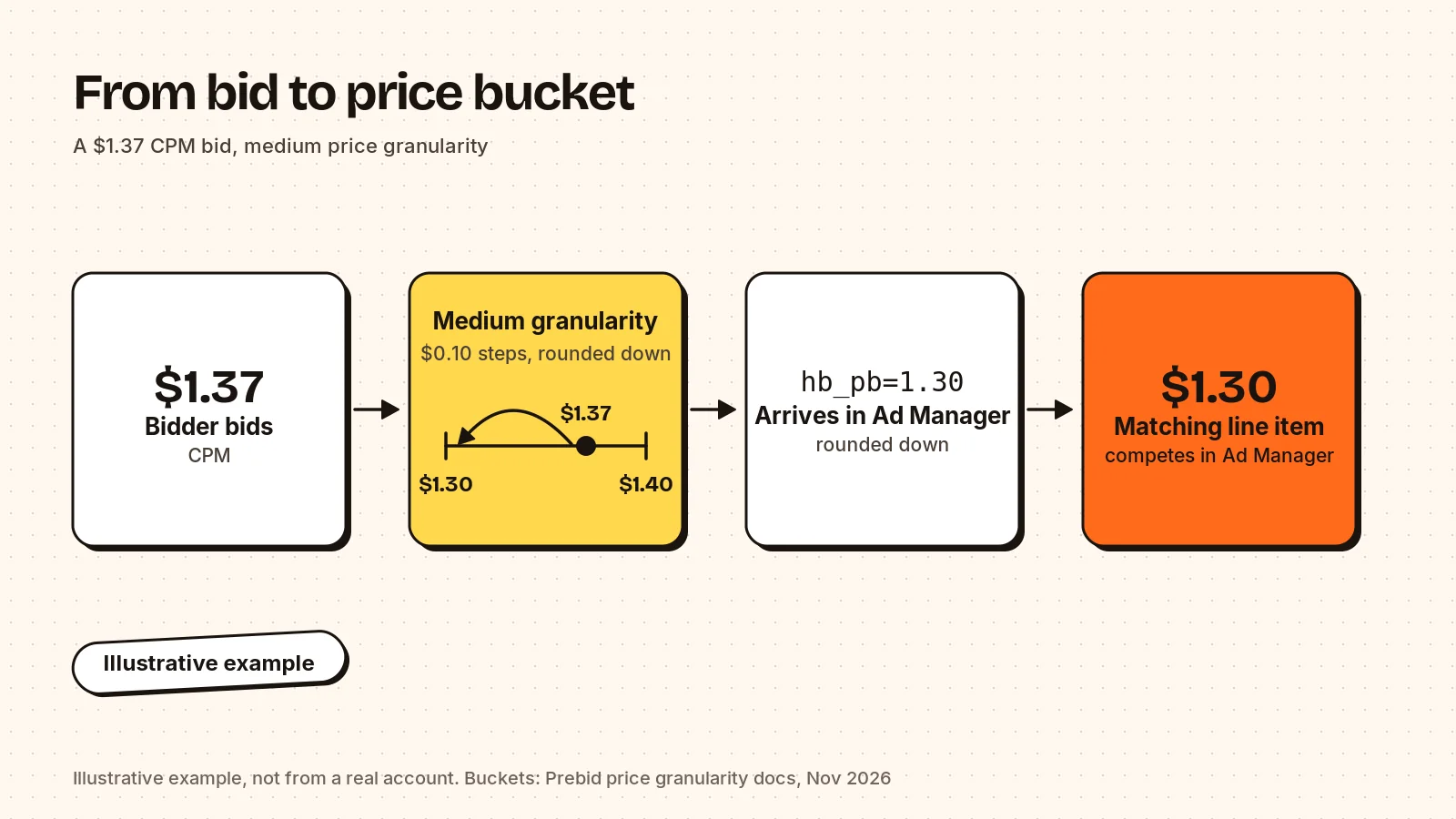
The figures in this example are illustrative, not from a real account. Say a bidder bids $1.37 CPM. With medium granularity, Prebid’s price granularity page says buckets go up in $0.10 steps to a $20 cap, and bids are rounded down. So hb_pb arrives in Ad Manager as 1.30, and your 1.30 line item is the one that competes.
Medium granularity needs 201 line items per bidder. If you send all bids for three bidders, that is 3 x 201 = 603 line items. This is why Prebid offers a script, the Prebid Line Item Manager, and its guide notes that a setup can mean thousands of line items. Decide granularity before anyone starts creating them, because changing it later means rebuilding the set.
Want to see the creative step visually? The Learn video The Prebid Universal Creative covers it in about a minute.
Step 5: Test before you go live
Test on a staging page first. Prebid’s troubleshooting guide lists the checks. Start with these four:
- Add
?pbjs_debug=trueto the page URL. Prebid then shows its errors and debug messages in the browser console. Filter byMESSAGE:to follow the auction: bidders called, key-values set, ad rendered. - Type
pbjs.versionin the console to confirm which build is actually on the page. Then runpbjs.getBidResponses()to see every bid that came back, with bidder, CPM and size. - Open the Network tab, find the request to Ad Manager and check that the
hb_values are in it. Nohb_pbthere usually means the ad unit code did not match the slot, or GPT fired before Prebid finished. - Install Professor Prebid, Prebid’s Chrome extension, for a readable view of the auctions and bids on any page that runs Prebid.
Then watch the first few days in Ad Manager reports. Prebid line items should start winning some impressions. If they never win, check the line item priority and the creative before you blame the bidders.
Go-live checklist
Run through this table before you switch Prebid on for real traffic. Each row is a check you can tick off in a few minutes.
| Area | Check | How to confirm |
|---|---|---|
| Build | Bundle has only the bidders and modules you use, including GPT Pre-Auction | Check the modules list or modules.json used for the build |
| Build | No deprecated bidder codes (for example appnexus) without a plan to move | Compare your bids[] with the Prebid download page notes |
| Ad units | Every ad unit code matches a GPT ad unit path or div ID | Console: pbjs.adUnits against the slots on the page |
| Ad units | Bid params copied from each bidder’s docs page and partner email | Each bidder appears in pbjs.getBidResponses() |
| GPT wiring | disableInitialLoad() runs before any display() or refresh() | Network tab: one Ad Manager request, after the auction |
| GPT wiring | Failsafe timeout is in place | Block prebid.js in DevTools; ads should still load |
| Ad Manager | Keys created, names 20 characters or fewer | Inventory, Key-values |
| Ad Manager | Line item set matches your price granularity | Spot-check a few buckets, such as 1.30 and 5.00 |
| Ad Manager | Prebid Universal Creative attached to every line item | Preview a test line item |
| Testing | hb_pb reaches the Ad Manager request | ?pbjs_debug=true and the Network tab |
Go deeper
- Glossary: Prebid.js, header bidding wrapper, bid adapter, price granularity
- Learn videos: How Prebid.js runs an auction, How a page asks for an ad: the GPT tag
- Academy: Level 3, Header Bidding
- Related reading: Understanding header bidding and Header bidding optimisation for publishers
Already running Prebid and not sure the setup is sound? Take the 10-question monetisation health check. It asks about your header bidding timeout, bidders, floors and consent, and gives you a score out of 100 and a short fix for each gap it finds.
Learn in 60s
Short vertical lessons from our team. Tap to watch, swipe for the next.
 1:13Ep 5: AdCP vs AAMP, do you have to pick one?
Ep 5: AdCP vs AAMP, do you have to pick one?
 1:02Ep 4: adagents.json, the guest list for AI agents
Ep 4: adagents.json, the guest list for AI agents
 1:08Ep 3: Completed isn’t live: two statuses of a media buy
Ep 3: Completed isn’t live: two statuses of a media buy
 1:07Ep 2: Products, not placements
Ep 2: Products, not placements
 1:04Ep 1: AdCP, how AI agents buy ads
Ep 1: AdCP, how AI agents buy ads
 1:16Prebid 10 and 11: what changed in your wrapper
Prebid 10 and 11: what changed in your wrapper
 1:04App developers: from AdMob alone to in-app bidding
App developers: from AdMob alone to in-app bidding
 1:04CTV publishers: from one app to many buyers
CTV publishers: from one app to many buyers
 1:01Web gaming sites: rewarded and interstitial ads
Web gaming sites: rewarded and interstitial ads
 1:05Finance publishers: high CPMs and strict brand safety
Finance publishers: high CPMs and strict brand safety